
From Spreadsheets to Strategy: Automating Amazon Ad Reporting (Discontinued tool)
The Problem: Your Team is Buried in Spreadsheets
Most Amazon ad teams spend their days doing manual work, not making strategic decisions. They download endless reports, copy-paste data, and try to make sense of it all. This slow, frustrating process wastes time and money.
From my time at Amazon Advertising, I saw how this held good teams back. They were stuck looking at the past instead of planning for the future. I knew there had to be a better way.
The Solution: A Direct Connection to Your Ad Data
I built an automation engine that connects directly to the Amazon Advertising API. This tool works in the background, automatically pulling all your ad data from every marketplace into one clean, central place.
No more manual downloads. No more messy spreadsheets. The system frees your team from repetitive tasks so they can focus on what actually grows the business.
The Advantage: From Operations to Strategy
This automation does more than save time. It lets your team focus on what matters:
- See Your Real Profit: By adding your product costs, you can see the actual net profit of every single ad and keyword. You stop guessing and start making money-driven decisions.
- Measure Total Growth: Track how your ads lift your total sales, not just the sales attributed to a click. This gives you a true picture of your brand's growth.
- Use Your Favorite Tools: The data flows directly into the tools your team already uses, whether it's Google Looker Studio (recommended with this code) or Microsoft Power BI.
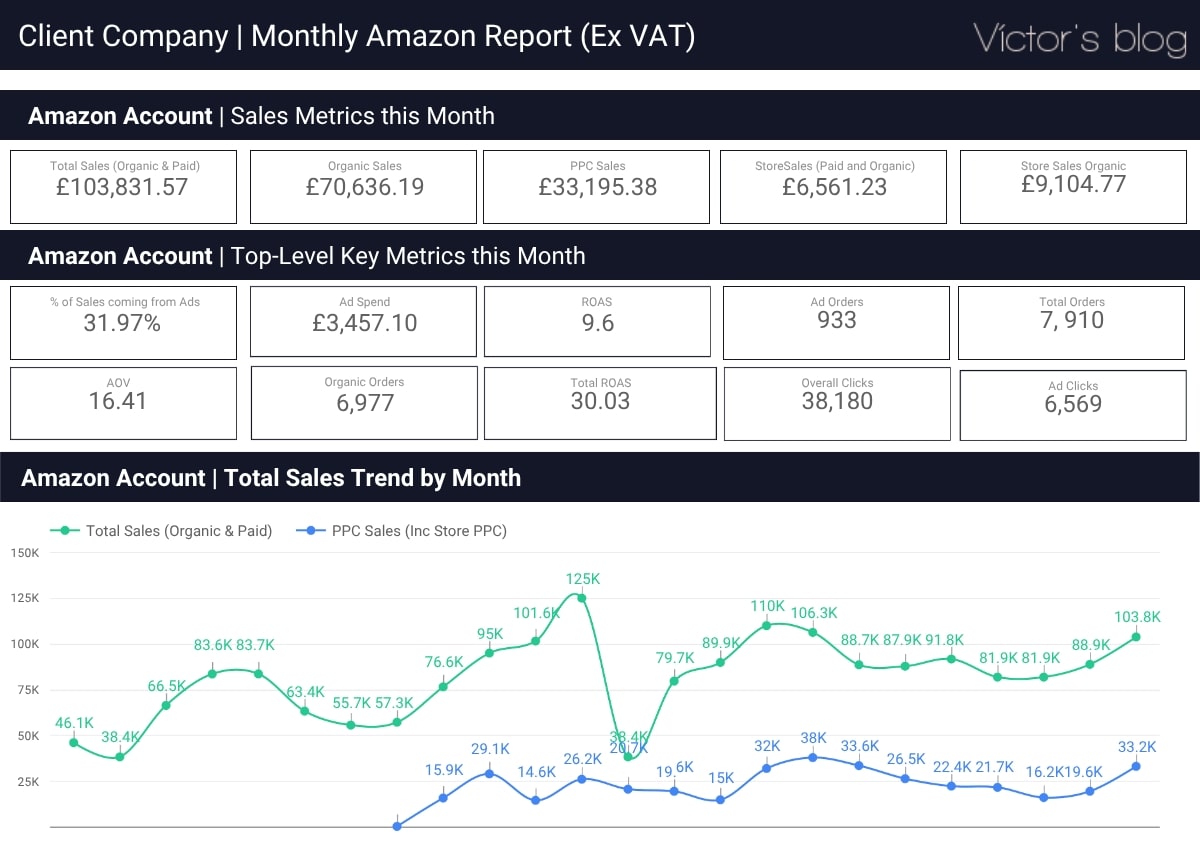
This solution turns reporting from a daily chore into a strategic advantage. The Python code behind this tool is open source and available on my GitHub.
Project Evolution: Why Simpler is Now Smarter
So, why did I stop using this custom tool? Because the market got smarter, and simpler solutions became available.
Today, for most brands, it's more efficient to use a platform like Skai (formerly Kenshoo). You can export clean data directly to a Google Sheet, and if you already have a dashboard in Google Looker Studio, connecting it takes just a few minutes. This workflow delivers most of the benefits with a fraction of the setup.
This shows my philosophy: always choose the right tool for the job. But for the most complex challenges, like pulling data from the Amazon DSP platform (If you have access to the Beta), custom API development remains the best way to gain a true competitive edge.
Special thanks to:
- Micaela Milano: Her support helped me make more and better tools during my time at Amazon. Always be thankful to people that make you grow.